Twelve years ago, my job was simple on paper: break software before users did.
Over time, the software changed. Products became bigger. Mobile apps started carrying onboarding, payments, notifications, authentication, personalization, deep links, webviews, analytics, and AI-powered journeys — sometimes all on the same screen.
But one thing did not change.
Users still find the paths we forget to test.
That is the uncomfortable truth of quality engineering. You can have strong regression coverage, good automation, stable CI/CD pipelines, and experienced testers — and still miss issues because real users do not behave like test cases.
They tap quickly. They go back at the wrong time. They open the app from a notification. They land directly on a deep-linked screen. They interrupt flows mid-way. They do things that are perfectly normal for them but completely unexpected for the system.
This is where I believe AI can make mobile QA meaningfully stronger. Not by replacing QA engineers, but by helping teams explore more of the app, observe failures earlier, and produce better evidence when something breaks.
The Problem With Only Scripted Automation
Traditional automation is extremely valuable. I still believe every serious engineering team needs it. A login test should confirm login works. A payment test should confirm payment works. A notification test should confirm the notification opens the right screen.
But scripted automation has one hard limitation: it checks what we already know to test.
And in my experience, most production issues do not come from the happy path. They come from awkward, unexpected, rarely visited corners of the app — states no one thought to write a test for.
Traditional QA
- Predefined test cases
- Strong for known flows
- Protects regression baseline
- Finds expected issues reliably
AI Exploratory QA
- Learns from app behaviour
- Explores unexpected paths
- Covers more hidden states
- Finds unknown issues faster
Scripted automation should remain the backbone of any serious QA strategy — especially for regulated flows, payment journeys, and critical regressions where deterministic outcomes matter. AI exploratory testing is a complement, not a replacement. The two work better together than either does alone.
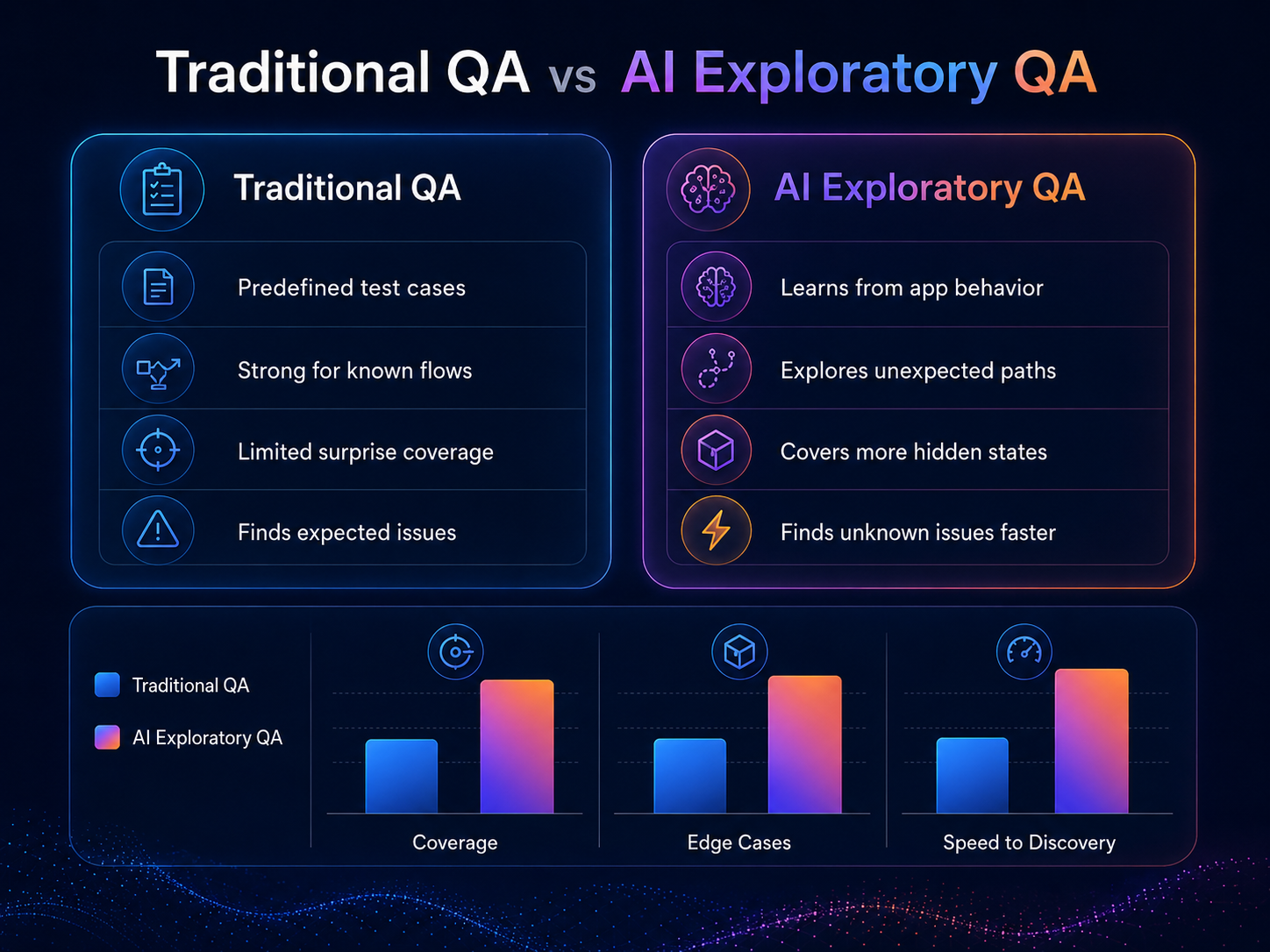
Scripted automation protects known flows. AI exploratory QA helps discover what we didn't know to test.
What AI Exploratory QA Actually Means
When people hear "AI in QA," they often think of test case generation or self-healing locators. Those are useful incremental improvements. But one of the more powerful applications is intelligent exploration of the app itself.
The idea is not complicated: instead of only telling automation exactly what steps to follow, we give the system the ability to explore the app the way a curious — or awkward — user might.
Practically, this means using a vision-capable model to interpret the current screen state, identify what actions are available, and select the next interaction — the same way an experienced tester might read a screen and decide what to try next. The difference is scale and endurance. A system can do this across hundreds of paths without fatigue.
Observe
The system reads the current screen, visible elements, and possible user actions — including what a screenshot reveals about app state.
Decide
It selects the next useful action rather than blindly repeating the same predefined path.
Act
It taps, swipes, types, goes back, or opens a deep link — behaving like a real mobile user navigating the product.
Validate
After every action, it checks app health, logs, screenshots, and failure signals before deciding whether to continue.
In a standard automation test, the question is: Did this expected journey pass?
In AI exploratory testing, the question becomes: What can the system discover on its own — and what evidence does it leave behind?
A Simple Mental Model
I like to think of the app as a map. Every screen is a location. Every tap, swipe, back action, or deep link is a road. Every new screen discovered expands the map. Every crash or broken UI marks a danger zone.
The goal is to explore intelligently, avoid getting stuck in loops, detect failure quickly, and produce evidence that developers can actually use. A long run that ends in a timeout is almost useless. A short run that ends with a screenshot, a log dump, and a clear failure point is extremely useful.
I've seen pipelines run for 40 minutes and report only a timeout on a session that had already crashed in the first 90 seconds. The test kept running. Nobody noticed until the next morning. The root cause was a change nobody thought to add a test for — because nobody had seen that state before.
That is the gap AI exploration is designed to close.
How the Flow Works
A practical AI-powered mobile QA loop looks something like this:
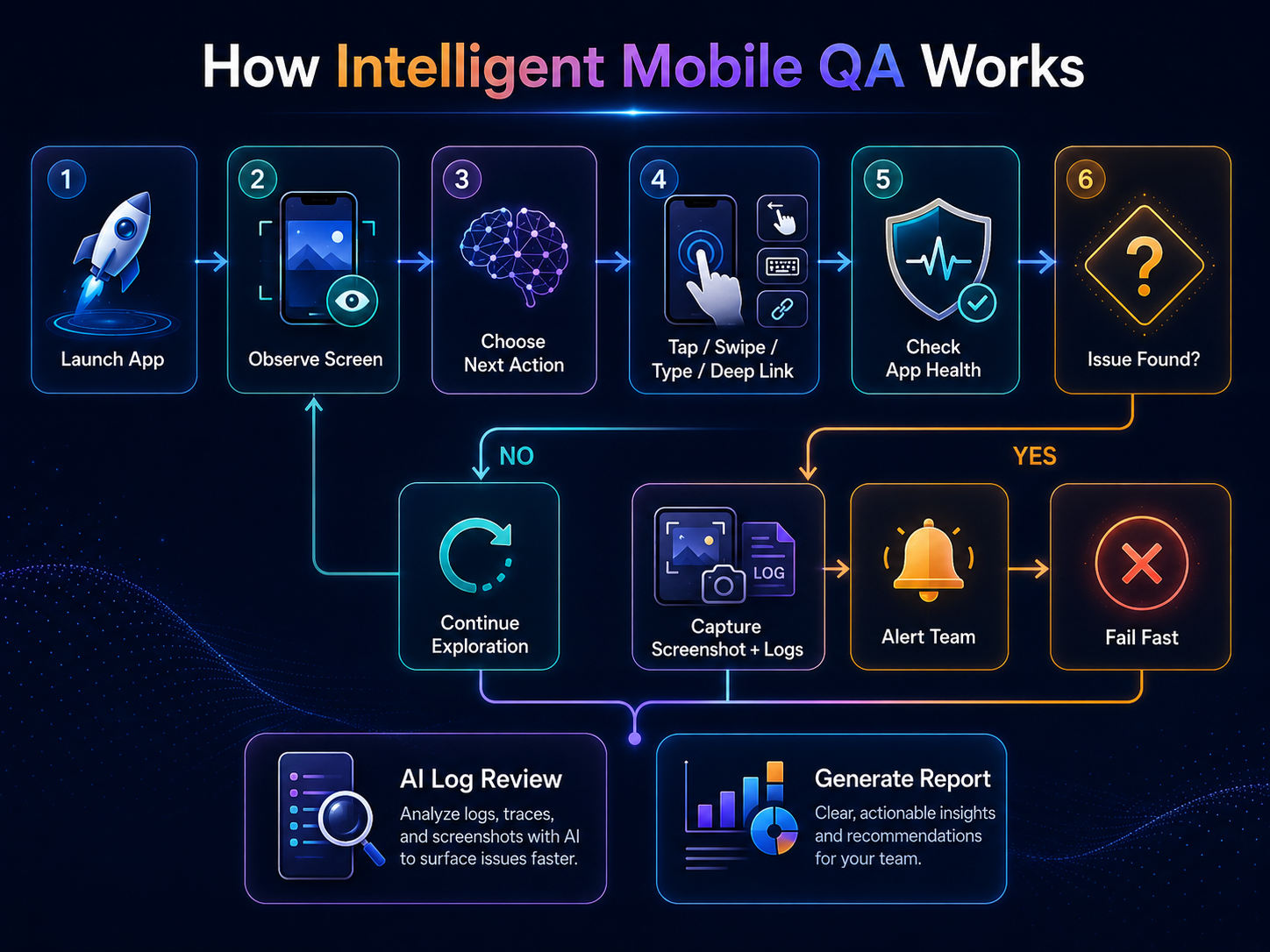
Observe → act → validate → either continue exploration or fail fast with evidence.
The health check after every action is the critical part. The system should not continue if the app has already crashed or frozen. Stop quickly, collect evidence, make the failure visible immediately.
In mobile QA, a fast failure with good logs is far more useful than a long-running test that ends with a vague timeout error.
Where AI Helps the Most
1. Smarter app exploration
The system can learn which actions lead to new screens and which are repetitive dead ends. If tapping a card opens a new journey, that action is treated as useful. If tapping the same empty area does nothing three times in a row, the system can reduce that behaviour and move on. Over time, the exploration becomes more directed — not random.
2. Finding hidden screens and edge cases
Large apps often have screens reachable only through notifications, campaigns, deep links, specific account states, or unusual action sequences. Standard regression suites rarely cover these paths because nobody thought to write a test for them. AI exploratory testing uncovers those paths by combining gestures with direct entry points — treating the app as a space to explore rather than a checklist to pass.
3. Visual UI validation
Not every issue is a crash. Sometimes the app technically continues running but the screen is broken: blank pages, placeholder text, broken layout, unreadable content, partial loading, unexpected error states. A vision-capable model reviewing screenshots after each action adds an extra validation layer that log-only monitoring misses entirely.
4. Log review and failure classification
Mobile logs are noisy. A good system uses rule-based checks for obvious, known failures first — fast and deterministic. For larger or ambiguous log output, an LLM can summarise the most relevant signals and point toward likely failure areas. This helps teams move faster from "something failed somewhere" to "here is where to look."
The Most Important Principle: Fail Fast
One of the most common mistakes in mobile automation is letting a dead session continue running. The app crashes, but the test keeps waiting. The session freezes, but the pipeline keeps going. The final output is a timeout. No clear failure reason. No useful evidence for the developer.
I've seen this cost teams hours of debugging time — not because the failure was complex, but because the evidence was lost by the time anyone looked.
- Is the app still running?
- Is the app still in the foreground?
- Did logs show a fatal error or exception?
- Did the app navigate to an unexpected error screen?
- Is the test session itself still healthy?
- Is there enough signal to fail immediately and save everyone's time?
If the answer suggests a real failure, the test should stop, capture proof, and mark the run as failed. That gives developers something they can actually use: a screenshot of the failure state, the relevant logs, the sequence of actions that led there, and a clear point of failure — not a timeout at the end of a 40-minute run.
What This Gives QA Teams
AI-powered exploratory testing changes the kind of feedback QA can deliver to the rest of the team. The shift is not primarily about automation speed or test count. It is about the quality and usefulness of the signal.
Teams that move from scripted-only to hybrid AI exploration tend to see the same consistent improvement: not just more issues found, but better evidence attached to every issue. Developers get screenshots, logs, and action sequences — not a vague failure message.
Unknown app states get covered — paths that nobody thought to test because nobody had seen them before.
Crash discovery happens earlier in the cycle, closer to the change that caused it, when it is cheapest to fix.
Release confidence improves — not because more tests passed, but because more of the app was actually exercised.
Instead of only saying "Regression passed," QA can say:
We explored multiple app states, covered deep entry points, checked logs for hidden failures, and captured evidence for every issue found — including paths nobody had written a test case for.
That is a much stronger quality signal — for engineering teams, for product teams, and for the release decision itself.
Where It Still Breaks Down
Any honest post about AI in QA has to include this section. AI exploratory testing has real failure modes, and teams that don't plan for them will be disappointed.
- Non-determinism: AI-driven exploration does not follow the same path every run. This makes reproducing exact failure sequences harder than in scripted automation — you get evidence, but not always a perfect repro step.
- Visual false positives: Screenshot-based validation can flag normal states as broken — loading screens, animations, skeleton UIs. Tuning the validation layer takes time and iteration.
- Log hallucination risk: LLM-based log summarisation can misread ambiguous signals. Always pair it with rule-based checks for known failure patterns. Use AI for the hard cases, not the obvious ones.
- Cost and latency in CI/CD: Running LLM calls inside every CI pipeline adds real cost and time. This approach works best as a scheduled deep-exploration run — nightly or pre-release — not on every commit.
- It does not replace judgement: The system surfaces evidence. A QA engineer still has to decide what matters, what to escalate, and what is acceptable risk. That judgement does not get automated.
These are solvable problems, not reasons to avoid the approach. But they are worth knowing before you start.
AI Will Not Replace QA Engineers
I don't believe AI will replace good QA engineers. And I say that as someone who has spent a lot of time building and integrating AI into quality workflows.
Good QA is not just clicking buttons or writing test cases. It is understanding risk. It is knowing where systems break under real conditions. It is questioning assumptions in requirements before a line of code is written. It is thinking like a user, a developer, and sometimes a product manager — all at once.
AI can explore faster than humans. It can read logs faster. It can repeat experiments without fatigue. It can highlight patterns across thousands of runs. But humans still decide what matters, what risk is acceptable, and what "good enough" means for this product at this moment.
It is all three working together. Scripted automation protects what you know. AI exploration finds what you don't. Human judgement decides what to do about it.
How I Would Start Small
Teams don't need to build a complex AI testing platform from day one. A practical starting point is genuinely simple — and each step adds value on its own before the next one:
Start with exploratory automation
Use a framework like Appium or Maestro to run semi-random gesture sequences and log every screen visited. Just the coverage map is valuable before any AI is involved.
Add health checks after every action
Validate app process state, foreground status, and log output after each interaction — not just at the end of the run. This alone dramatically improves failure evidence quality.
Capture structured evidence
Screenshot on failure, dump the relevant log window, record the action sequence. Make failures self-documenting so developers can investigate without needing a repro session.
Add AI gradually and honestly
Introduce vision-based screenshot review and LLM log summarisation as layers on top of a working foundation — not as a replacement for it. Measure what they add before depending on them.
Final Thoughts
Think back to the user from the introduction. The one who opened the app from a notification, landed on a deep-linked screen mid-journey, tapped back at the wrong moment, and hit a state that nobody had ever tested.
That user still exists. AI exploratory testing doesn't eliminate them — but it finds their path before they do. It visits those corners of the app that no test case covers. It catches the crash that only happens in that specific sequence. It produces the evidence the team needs to fix it before it becomes a production incident.
The most interesting part of QA has never been writing test cases. It has always been finding the assumptions that break when real users actually touch the product.
AI-powered exploration helps with exactly that. Used well — alongside scripted automation and human judgement — it doesn't make QA less human. It makes QA more effective where it matters most.
Loading comments…